Log an answer in 60 seconds
One big button creates today’s answer page: question, a photo of your handwritten answer, feedback, score and one thing to fix.
₹299 for the complete UPSC Boot Camp. It goes up after our first batch.
See the kitsFrom a Karol Bagh PG, Delhi
In my Karol Bagh PG, I watched friends study for years without knowing what to do next, forgetting what they'd revised and never knowing if their answers were improving. So I built the system they needed. It fixes all three, every day.
₹299 one-time · set up in 10 minutes · free Google and Notion accounts work
no AI grading.
no rank promises.
just your prep, organised.
Answer Lab HQ · UPSC Boot Camp
Situation report
I saw these on desks all over Karol Bagh. Maybe one of them is yours.
Revised Polity in March. It’s October. Gone.
6 months of current affairs. Remember almost none of it.
73 topics… where do I even start today?
Used to study 10 hours. Now I can barely do 5.
Wrote 20 Mains answers. Are they getting better??
Missed 3 days. Felt like starting over.
It's not you. It's the missing system.
Be honest with yourself
Same you. Same books. Same hours. The only difference is whether your prep has a system.
Tomorrow morning
You open three notebooks and a Telegram folder and spend 40 minutes deciding what to study.
You open one tab. It says: do this next. You start in two minutes.
Day 7
Polity from March is quietly fading. You won’t notice until a mock test asks about it.
Your whole syllabus is mapped. Revisions come back on day 1, 3, 7, 14 and 30, so nothing fades.
Day 14
You miss three days. It feels like starting over, so you almost do.
You miss three days. The Reset Plan gets you back in one evening. Your streak resets, your XP stays.
Day 30
Twenty answers written. Are they getting better? No idea.
Your 1st and 3rd attempt at the same topic, side by side. You can see exactly what improved.
nothing dramatic happens. that's the problem.
Keep going the way you are and there's no big failure. Just another month of deciding what to study each morning, topics quietly fading, and answers you can't tell are improving.
Prelims is decided by a handful of marks. Those marks hide in the topics you forgot to revise.
One-time payment · set up in 10 minutes · free Google and Notion accounts are enough
Free mission planner
Takes 20 seconds. No sign-up, nothing saved. Just your numbers, worked out honestly.
Pick your exam date →
We'll show your days left, how many topics you need each week, and what happens if you wait.
Your mission briefing
If you start next week instead:
Simple maths to help you see the road ahead. It isn't a prediction or study advice. You know your prep best.
That date has passed or is very close.
Pick your next attempt's date and we'll map it out.
The daily loop
Each tool does one job, so nothing overlaps and nothing gets confusing.
Sheet 1 · Syllabus Command Center
See your whole syllabus and get told what to study next.
Sheet 2 · Revision & Intelligence Report
Revisions schedule themselves, and every mock shows you what to fix.
Sheet 3 · Daily Training & Habit Tracker
Plan the day, tick off missions and habits, and keep your streak.
Answer Lab · Notion add-on
Log Mains answers, fix one thing each time, and watch scores move.
The tools are linked by matching topic names. Nothing syncs automatically, so you stay in control of your data.
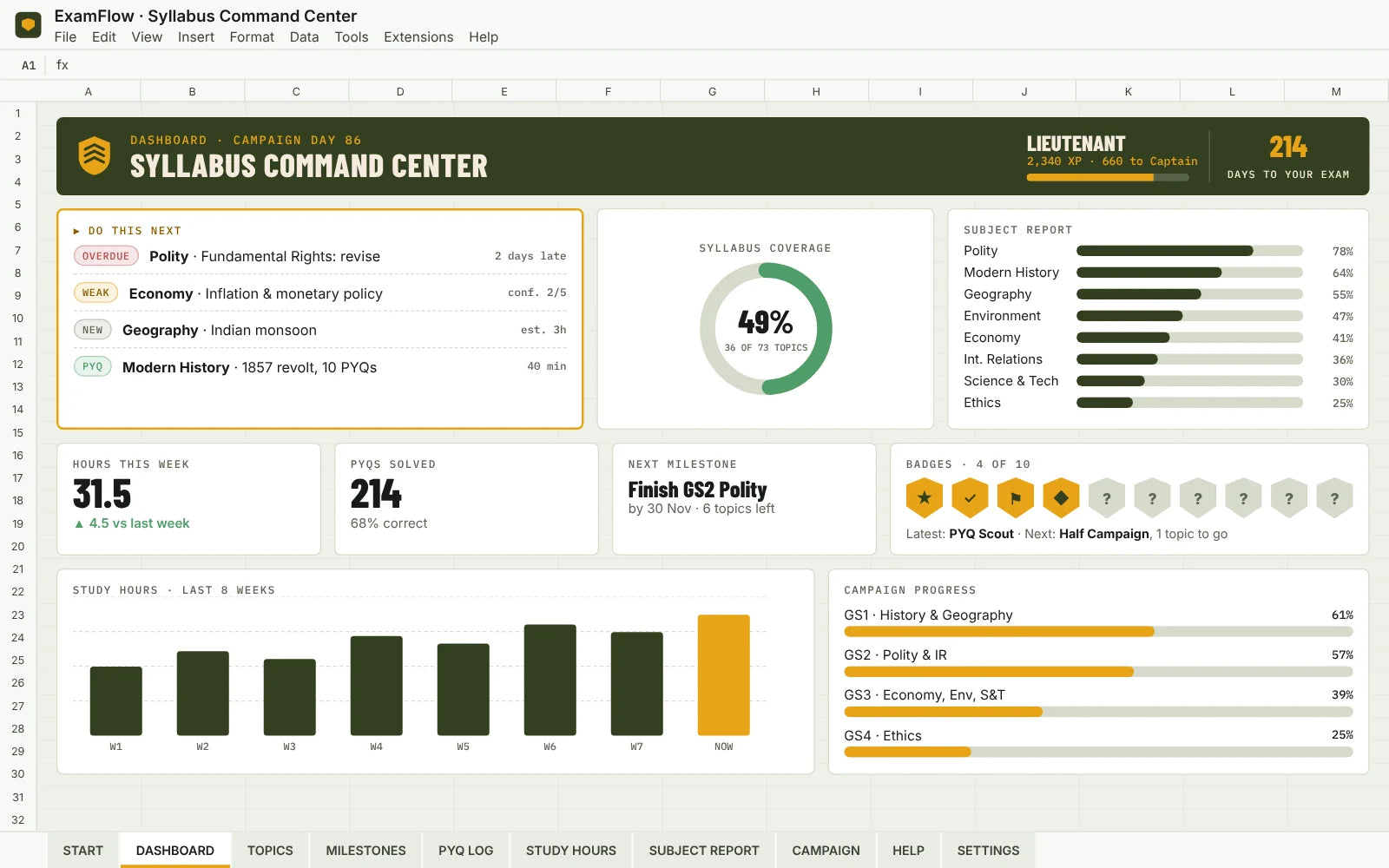
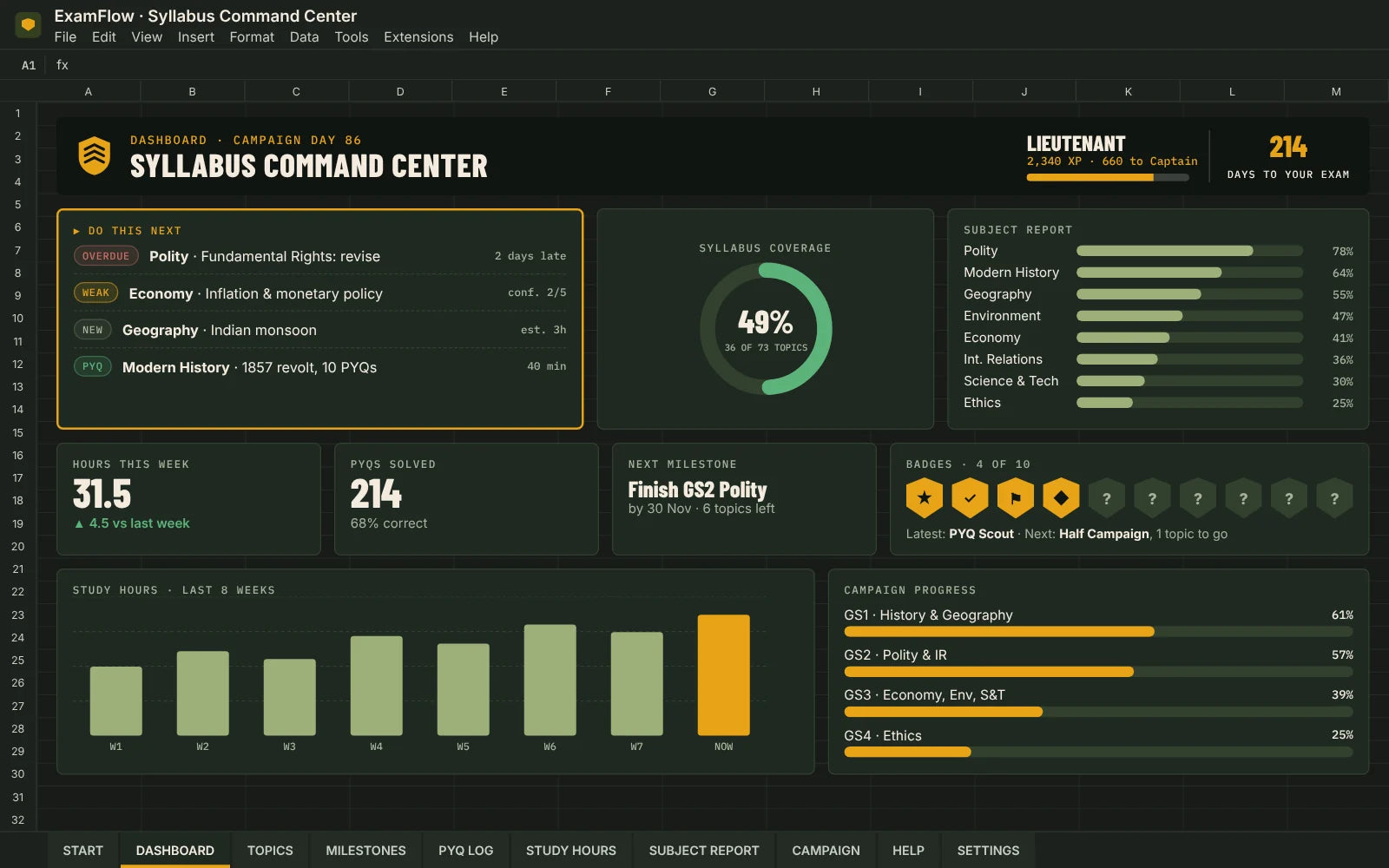
Sheet 1 Syllabus Command Center
See your whole UPSC syllabus, what is done, what is weak, and what to study next.
10 badges to earn, like First Deployment, Half Campaign and PYQ Scout
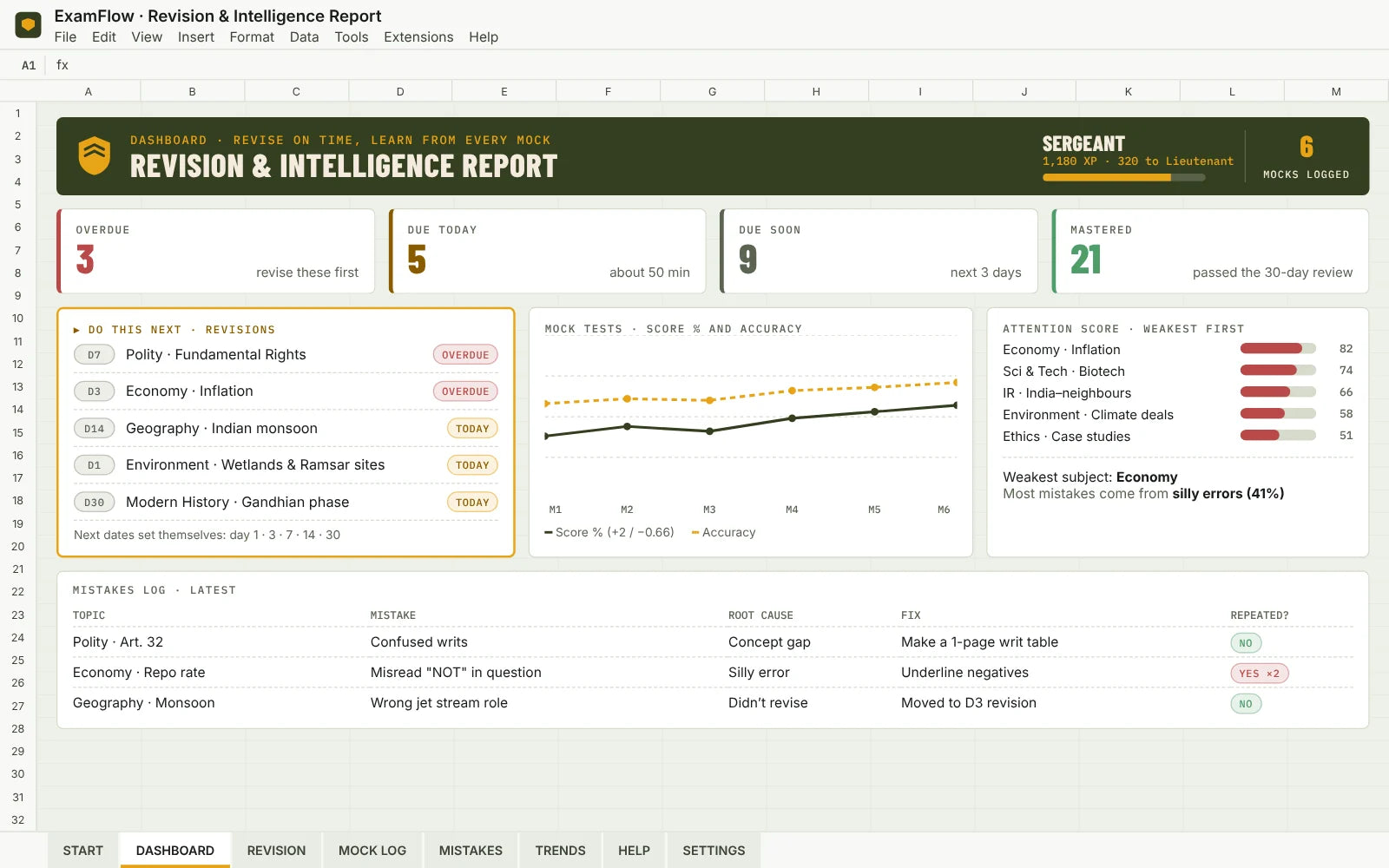
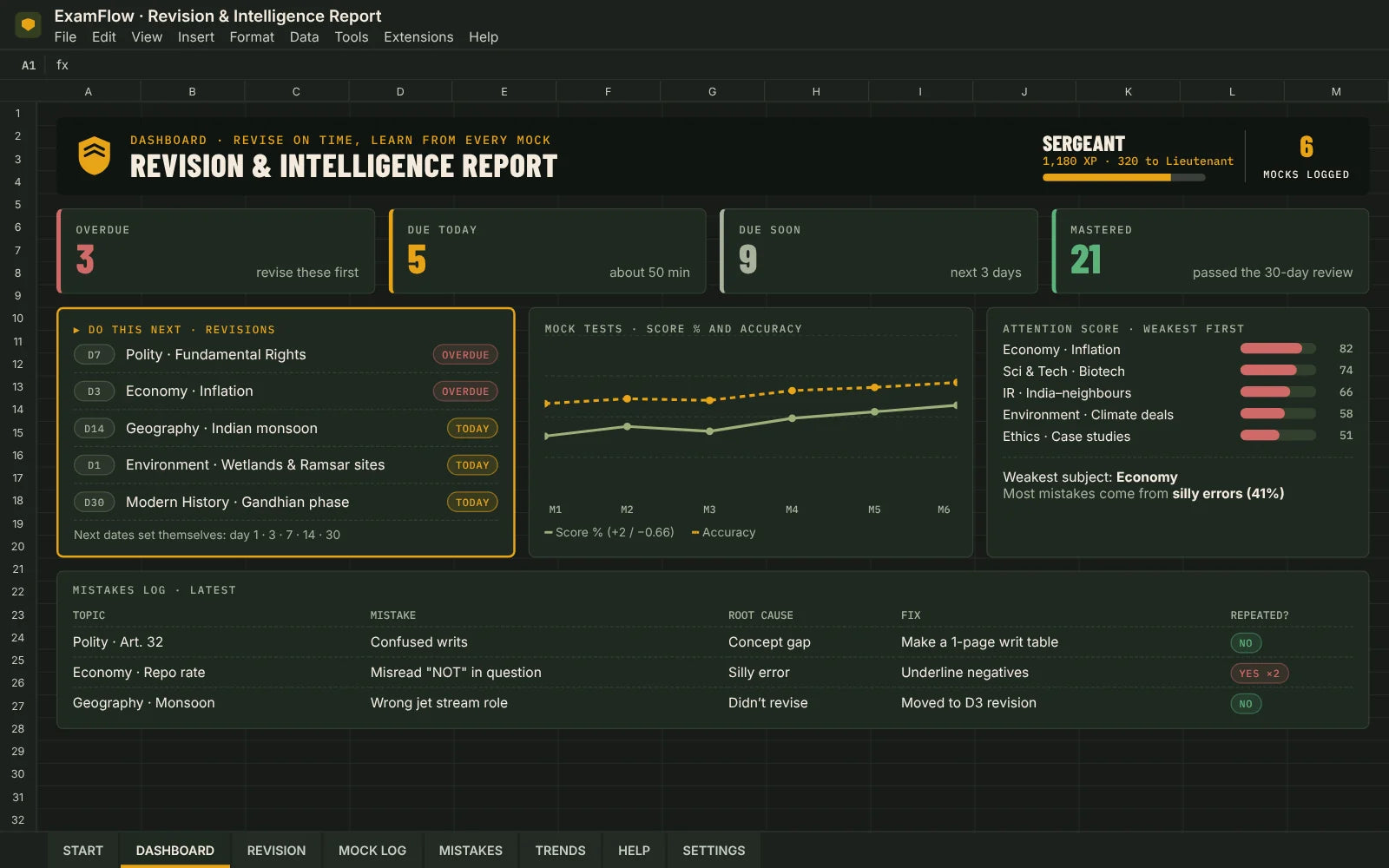
Sheet 2 Revision & Intelligence Report
Revise on time, learn from every mock test, and know exactly what to fix next.
10 badges to earn, like First Recall, Error Hunter, Accuracy Standard and Zero Backlog
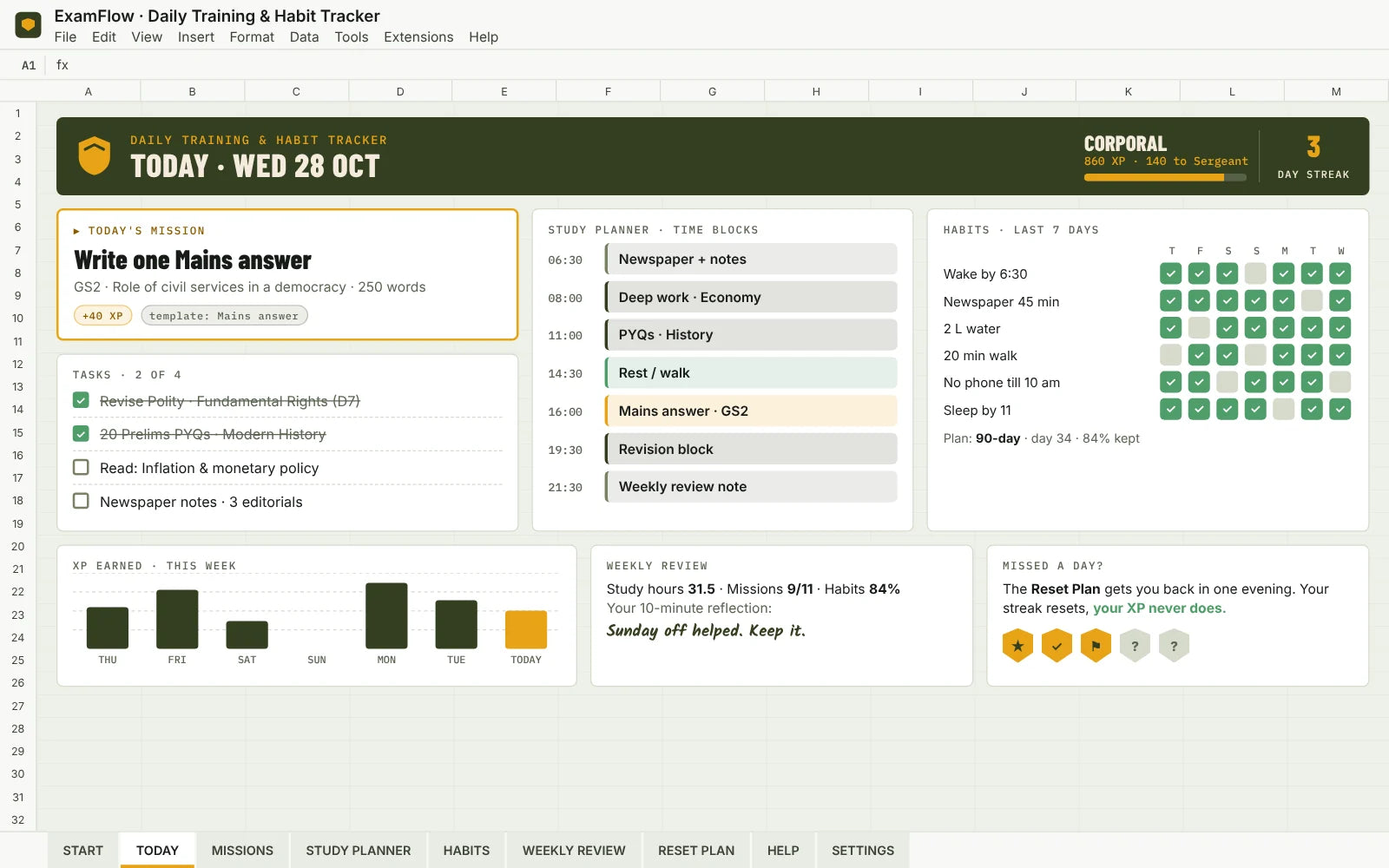
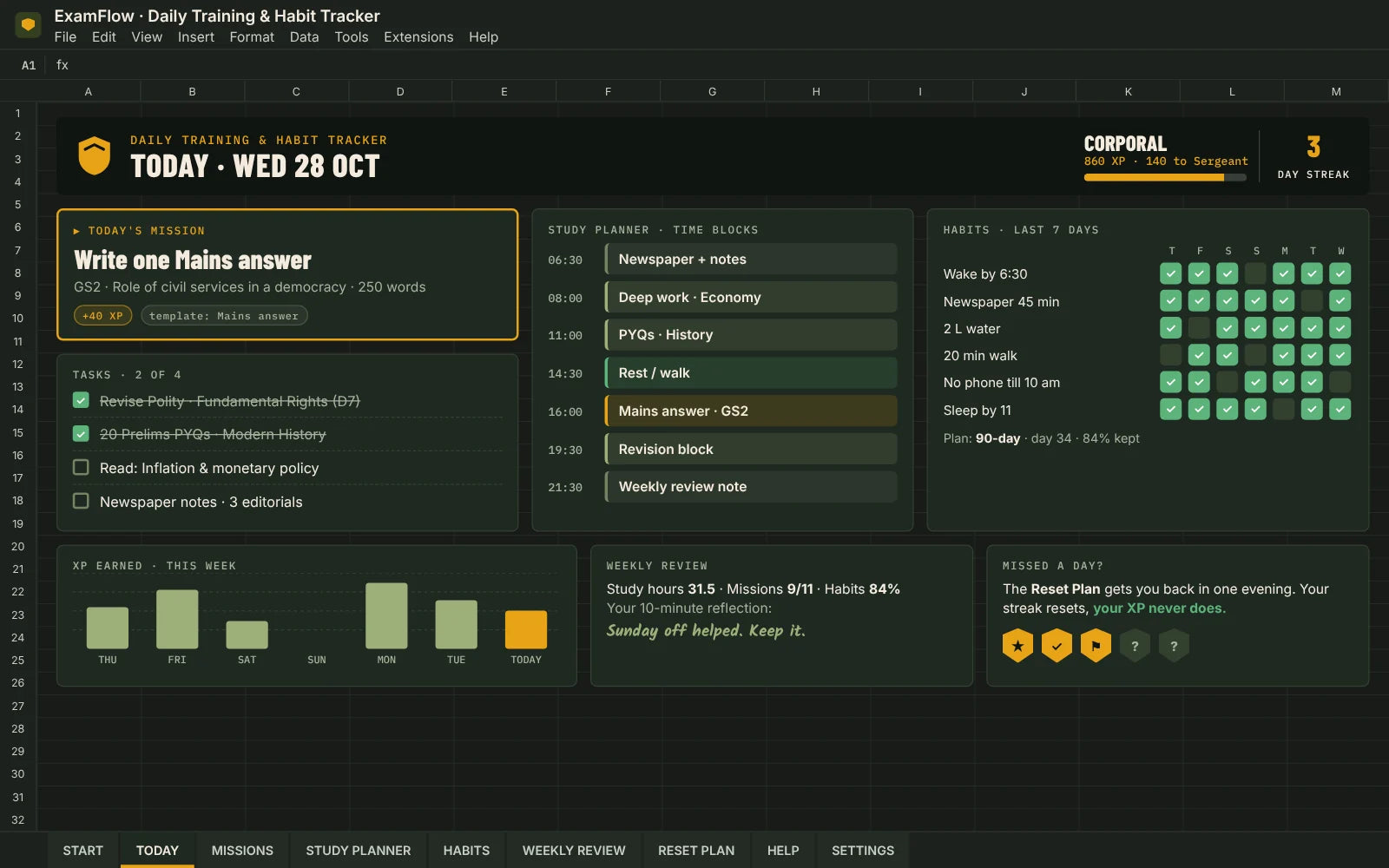
Sheet 3 Daily Training & Habit Tracker
Plan your day, tick off tasks and habits, and watch your progress grow.
10 badges to earn, like Consistency Protocol, Routine Builder and Recovery Specialist
Add-on · Notion
Write on paper like the real exam. Log it in about 60 seconds. Pick one thing to fix. Try the topic again and see the difference.
Write. Review. Improve. · Small steps. Stronger answers.
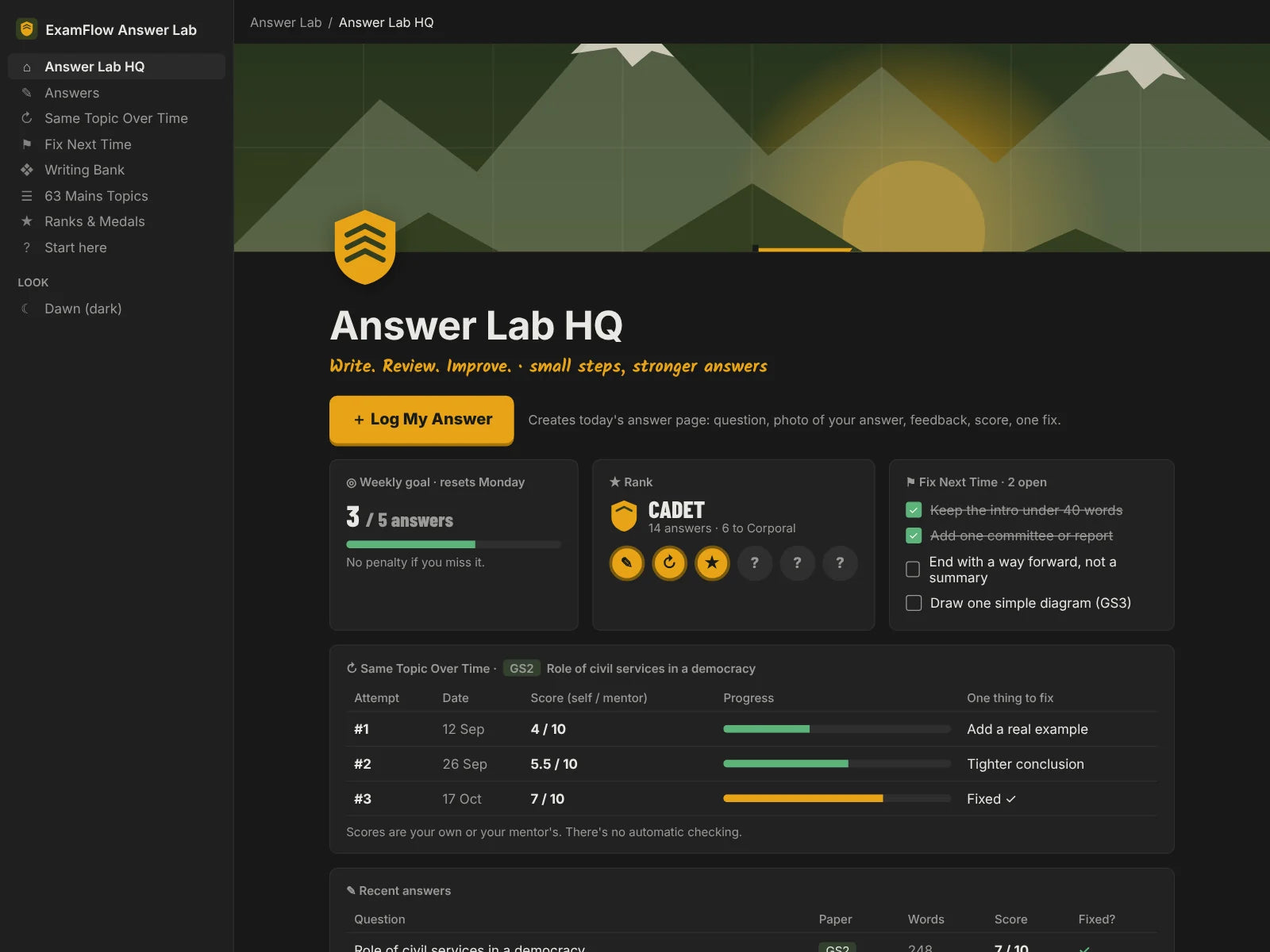
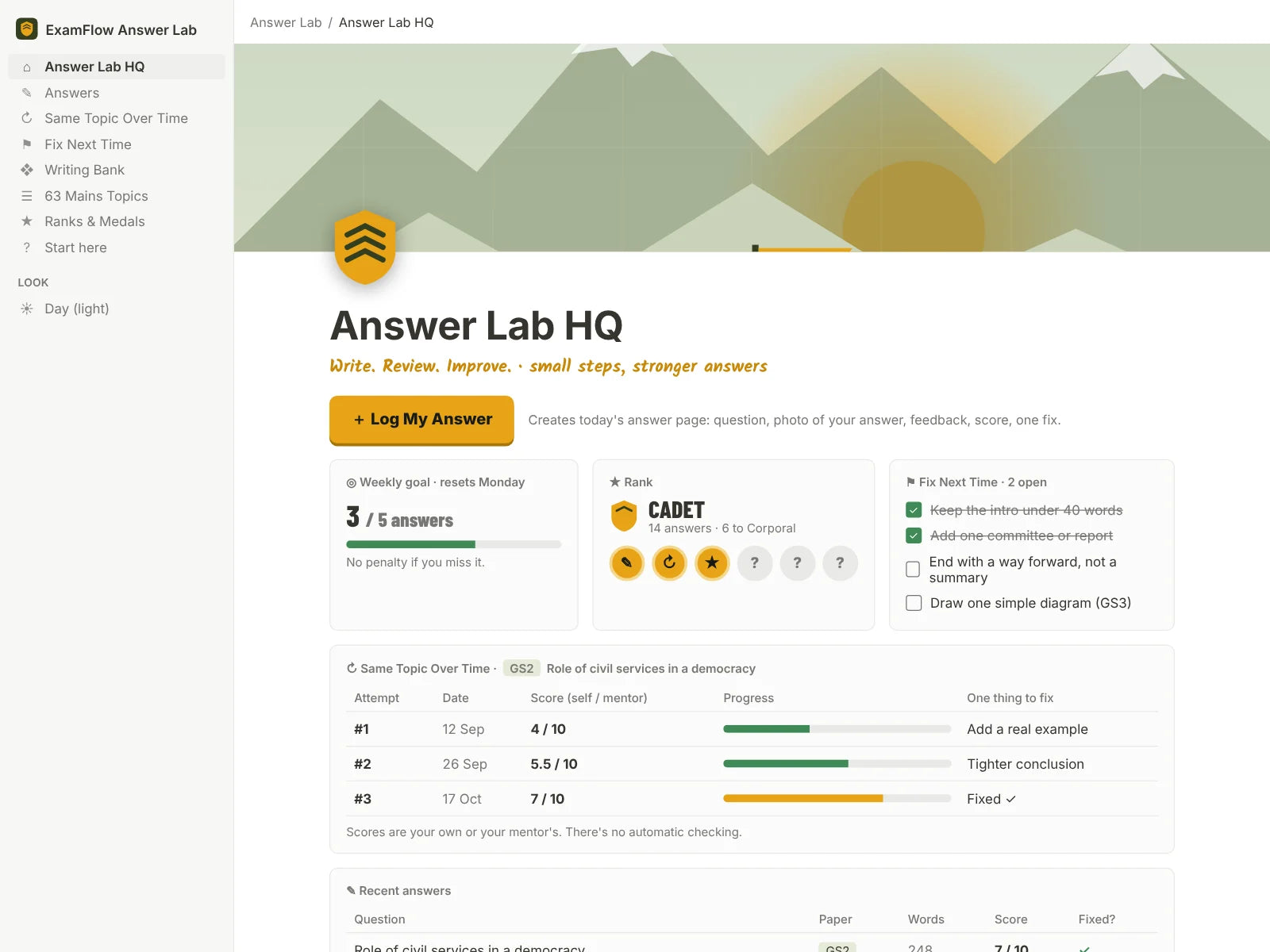
One big button creates today’s answer page: question, a photo of your handwritten answer, feedback, score and one thing to fix.
Every attempt at a topic side by side, so you can actually see whether your answers are getting better.
A running list of open fixes. Tick “Fixed?” on a later attempt and it disappears. Satisfying.
Pre-loaded to match the Sheets, plus a Writing Bank for examples, data points and great intro lines.
Recruit to Veteran, 6 medals and a weekly goal that resets every Monday with no penalty.
One click swaps all the artwork to match Notion’s dark or light mode. You configure nothing else.
Same topic over time
Sample dataGS2 · Role of civil services in a democracy
Attempt 1
4 / 10
Fix: add a real example
Attempt 2
5.5 / 10
Fix: tighter conclusion
Attempt 3
7 / 10
Fixed ✓
Weekly goal: 3 of 5 answers · resets every Monday, no penalty
Answers are self-assessed or mentor-assessed. There's no AI checking, and Answer Lab doesn't sync with the Sheets automatically.
The fun part
Every revision, every mock and every habit tick earns XP. Climb the ranks, unlock badges and upgrade your Training Base. It makes the long grind feel like progress.
XP
Each workbook gives XP only for its own work, so nothing is counted twice. Miss a day and your streak resets, but your XP never goes down.
Training Base
Badges
10 in each workbook, like Territory Secured, Error Hunter, Zero Backlog and Iron Discipline. Plus a countdown to the exam date you choose.
Ranks, XP and badges reward consistent use. They are motivation, not a measure of exam readiness.
Included · PDF guide
A friendly, illustrated guide that walks you from "I just paid" to "I know exactly what to do each morning". Your copy links are inside it too, so everything lives in one place.
seen enough?
Get all three Sheets, the Answer Lab and the Field Manual together.
One-time payment · instant delivery
A note from the founder
I lived in a PG in Karol Bagh. My roommates and friends were all preparing for UPSC, and every day I watched the same routine: one batch leaving for coaching, another coming back, everyone sitting down to study again.
Every month, new books arrived. Most of them stayed on the shelf, half-read. Notes were everywhere, nothing was organised, and the studying came in bursts instead of every day. Nobody was short on effort. They were short on a system.
I'm an engineer, and I kept thinking: this is a problem I can actually solve. So I built ExamFlow. It tells you what to study today, brings back what you'd otherwise forget, and shows whether your answers are getting better. It's simple enough to open on your phone between batches, and calm enough that a missed day doesn't feel like starting over.
It won't study for you. But it will make sure the hours you put in actually add up.
— Kirubahar, the engineer behind ExamFlow
Straight talk
Delivery
UPI, cards or netbanking through Razorpay at checkout.
Instantly after payment. Your copy links are inside it.
Click “Make a copy” for the Sheets and “Duplicate” for Notion. They’re private and yours.
Each tool comes with a demo copy full of sample data, so you can see it working before you add yours.
The offer
One-time payment. Yours to keep, with every future update included.
Kit 01
Know what to study. Stop forgetting it.
Best value
Kit 03
Know what to study, remember it, and watch your answers improve
Introductory price
Bought separately: ₹498. Together: ₹299. You save ₹199.
Start my Boot CampBuy now and every update we add is yours free. Students who join later will pay more for the same kit.
Kit 02
Watch your Mains answers get better
My promise: you get exactly what you see on this page. If something doesn't work, I'll fix it within 48 hours or give your money back. Not sure yet? Message me on Instagram or email before you buy. You'll hear back from a real person, not a bot.
Prices in ₹, inclusive of applicable taxes. Secure checkout by Razorpay.
Questions
No. A free Google account and a free Notion account are enough.
Yes. The Sheets work in the Google Sheets app and Answer Lab works in the Notion app. Typing a lot is easier on a laptop, but daily ticking and checking your dashboard is quick on a phone.
Yes. Rename, add or delete topics in any workbook. Answer Lab topics can be edited too.
No, and we’d rather be honest about it. The 3 workbooks and Answer Lab are linked by matching topic names, not by automatic sync. Each one awards XP only for its own work, so nothing is counted twice.
The Sheets cover both, including PYQs and mock tests with Prelims marking (+2 / −0.66, editable). Answer Lab is for Mains answer writing.
No. There’s no AI checking. You score your answers yourself or note your mentor’s or test series’ score, and Answer Lab helps you track and improve.
No tool can promise that, and we won’t. ExamFlow helps you stay organised and consistent. Ranks and badges reward showing up, not exam readiness.
You get an email instantly with the Field Manual PDF. Inside are your “Make a copy” and Notion links.
That’s a common Google Sheets display quirk. There’s a one-time fix in the HELP tab, and it’s in the Field Manual too.
Yes. ₹299 is our introductory price while our first batch of students helps us shape the next version. If you buy now, you keep every future update for free.
If anything doesn’t open or work as shown on this page, email me and I’ll fix it within 48 hours. If I can’t, you get a full refund. You also get a full refund if you were charged twice or never received your email. Because the files are yours to copy the moment you get them, I can’t refund change-of-mind purchases, so please ask me anything before you buy.
Please don’t. Each purchase is for one person. I kept the price at ₹299 so every aspirant can get their own copy, and every sale helps me keep improving it.
No. ExamFlow is independent. You set your own exam date; check official dates at upsc.gov.in.
Still unsure? Just write to us: examflowhq@gmail.com
That's the whole idea. Less deciding, more studying. I'd love to have you in the camp.
waiting a week doesn't save ₹299. it costs you 7 days of revision.
Not affiliated with UPSC or any coaching institute. You set your own exam date: check official dates at upsc.gov.in.